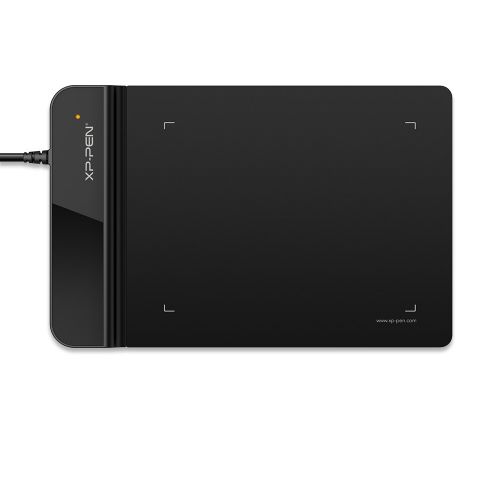

Deco 01 V2

10 x 6.25 inch working area, 60 degrees of tilt function.
Supports connects with Android devices and Chromebook OS.
Best choice for Drawing and E-Learning/Online Classes.
£59.99

FAST FREE SHIPPING

Ship from the UK; Free shipping on all orders

24-MONTH-WARRANTY

Hassle-free warranty

QUALITY PURCHASE

30-day money-back guarantee

TECH SUPPORT

Lifetime customer support

Colour:
Black

ESSENTIAL_ACCESSORIES

https://www.storexppen.co.uk/Uploads/uk/thumb/goods/148/5de59a37b18ff5dac35abe0c0d0d9a5f_thumb_500_500.jpg

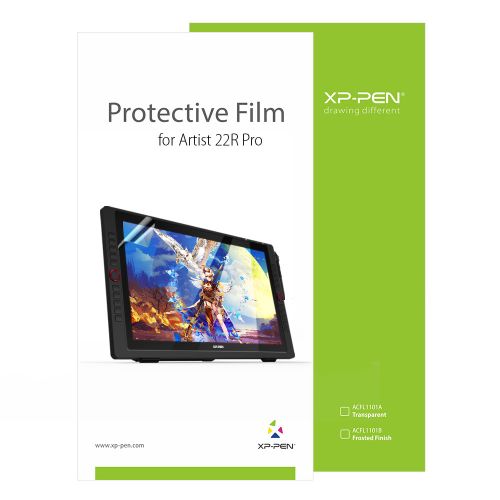
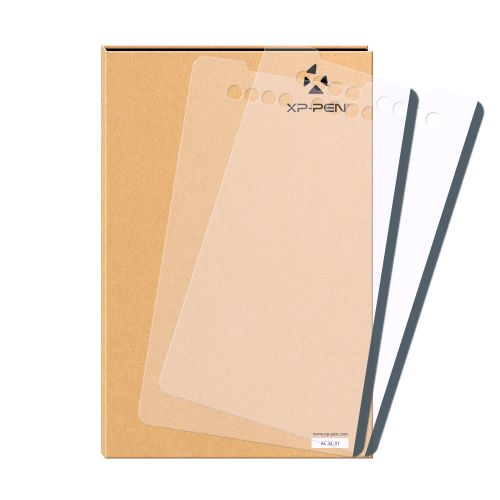
Tablet Protective Film ONLY suits for Deco series (Pack of 2)

+£7.99£19.99

60% Off
https://xpstoretest2.oss-us-west-1.aliyuncs.com/Uploads/uk/goods/20220209/7c5ceba5e907cfab786d77ac427afc82.jpg?x-oss-process=image/resize,w_200,h_200,m_fixed/format,webp

XPPen Sleeve Case ACJ08/ACJ09

+£16.99£19.99

15% Off
https://xpstoretest2.oss-us-west-1.aliyuncs.com/Uploads/goods/20171115/aad4191ed345b0fde9394d0a024eca79.jpg?x-oss-process=image/resize,w_200,h_200,m_fixed/format,webp

AC20 Cable Bag

+£15.99£29.99

47% Off
https://xpstoretest2.oss-us-west-1.aliyuncs.com/Uploads/goods/20180913/a57fbb14d888e274afaa2d2a0d7f212e.jpg?x-oss-process=image/resize,w_200,h_200,m_fixed/format,webp

AC08 Drawing Glove S/M/L Size

+£3.99£7.99

50% Off

QUANTITY:

Payment icon 0Payment icon 1Payment icon 2Payment icon 3Payment icon 4Payment icon 5Payment icon 6
seel-icon

Worry-Free Delivery® available with seel

ESTIMATED:

Deco 01 V2

New compatibility, new potential. More color, more brilliance.

imageimage

Enjoy a natural drawing experience.

The stylus supports up to 60 degrees of tilt brush effect and delivers smoother and more natural lines and strokes, while also giving you the ability to add shading to your creation and offering a more natural writing and drawing experience.

Tilt:60°

imageimage

Expand your world.

The Deco 01 V2's expansive tablet is big and brilliant! It comes with a 10 x 6.25 inch working area so you have more space to create and get work done. But with only 8 mm thickness, you can take it anywhere without the burden of lugging around a heavy tablet!

imageimage

Three vibrant colors, for creative inspiration.

Deco 01 V2 now is available in three vibrant colors. Choose your color, personalize your style, and show your unique creativity.

Pink

Green

Black

imageimage

Versatility

The Deco features eight, round, customizable express keys that fit easily to your fingertips.
With its blind spot reduction design,
you can find the position of your express keys efficiently and the shortcut keys can be programmed to many different software programs.

imageimage

Ultra-thin ultra-portable

Only 8 mm thinness of the Deco 01 V2 tablet, more lightweight and portable. Slip it into the back of your backpack for a moment of inspiration.

imageimage

Inspiration with a glimmer.

The Deco 01 V2 lights up at the ends of the drawing area, and comes with adjustable brightness levels, so you can work and create in your preferred lighting environment.

image
image
image
image
imageimage

A free and articulate stylus pen.

The stylus works just like a real pen, no battery and no charging required! The stylus is true-to-life with 8,192 levels of pressure sensitivity, giving it the intelligence to modify, navigate and create with a full pallet of brushes and pens.

imageimage

New compatibility, new potential.

The XPPen Deco 01 V2 supports connections with Android devices 6.0 and above.
It works with most major software including: ibis Paint X, FlipaClip, Medibang, Autodesk Sketchbook, Zenbrush and Artrage, etc.,
bringing you an all new creative experience with extreme portability and potential.

image
image

Works in vertical screen mode only. Make sure your Android device supports OTG function.

Engage, inspire, and immerse students and attendees like never before.

Sketch, paint, design, and edit photos on your tablet. A unit powerful enough to help you take your ideas even further, annotating directly in files and sharing their screen in real time while streaming, broadcasting, or web conferencing.
This flexibility allows the flow of creative ideas and the problem-solving process to be presented intuitively and efficiently.

image

Extensive compatibility.

Compatible with Windows 7 (or later), Android 6.0 (or later), Mac OS 10.10 (or later), Chrome OS 88 (or later) and Linux (Detailed versions).

image

Also compatible with many major designer software such as Photoshop, SAI, Painter, Illustrator and Clip Studio, etc.
* Please update your Windows to version 11 or Mac OS to version 12  first.

image

Product Gallery

image
image
image
image
image
image
image
image
  • Specifications

image

60° tilt

image

8192 levels

image

Battery-free EMR stylus

image

Customizable shortcut keys

image

Windows / Mac / Android / Chrome OS / Linux

  • Show More

image
Getting started with your
XPPen Deco 01 V2 Pen Tablet.
Learn more >
image
Deco 01 V2 Pen Tablet comes
with one free creative software.
Learn more >
Linux OSVersionPackage FormatSupported Software
ArchArch Linux2019.12.01(64-bit).deb, .shGIMP, Krita
CentosCentos7.0(64-bit).rpm, .shGIMP
Centos8(64-bit).rpm, .shGIMP, Krita
Debiandebian-9.5.0-amd64-netinst(64-bit).deb, .shGIMP, Krita
elementary OSelementary OS 5.0(64-bit).deb, .shGIMP, Krita
ezgo Linuxezgo14(64-bit).deb, .shGIMP, Krita
FedoraFedora32(64-bit).rpm, .shGIMP, Krita
MageiaMageia-7.1(64-bit).rpm, .shGIMP, Krita
Manjaromanjaro-xfce-20.1.2-201019(64-bit).deb, .shGIMP
Mintlinuxmint-18.2-cinnamon-64bit.deb, .shGIMP, Krita
OpenSUSEopenSUSE-Tumbleweed(64-bit).rpm, .shGIMP, Krita
Pop!_OSpop-os_19.10(64-bit).deb, .shGIMP, Krita
Red HatRed Hat7(64-bit).rpm, .shGIMP
UbuntuUbuntu14.04(64-bit).deb, .shGIMP, Krita
Ubuntu16.04(64-bit).deb, .shGIMP, Krita
Ubuntu17.04(64-bit).deb, .shGIMP, Krita
Ubuntu18.04(64-bit).deb, .shGIMP, Krita
Ubuntu19.04(64-bit).deb, .shGIMP, Krita
Ubuntu20.04(64-bit).deb, .shGIMP, Krita
FunctionKrita 4.3.0Gimp 2.10.20Inkscape 0.92
Pen Pressure Sensitivity
Tilt
Mouse Function
Eraser Button
(Stylus:PH01, P06)
Switch between Pen
and Eraser Modes
*If you have any further queries, please do not hesitate to contact us at service@xp-pen.com.

Linux OS

Arch
Version
Arch Linux2019.12.01(64-bit)
Package Format
.deb, .sh
Supported Software
GIMP, Krita
Centos
Version
Centos7.0(64-bit)
Centos8(64-bit)
Package Format
.rpm, .sh
.rpm, .sh
Supported Software
GIMP
GIMP, Krita
Debian
Version
debian-9.5.0-amd64-netinst(64-bit)
Package Format
.deb, .sh
Supported Software
GIMP, Krita
elementary OS
Version
elementary OS 5.0(64-bit)
Package Format
.deb, .sh
Supported Software
GIMP, Krita
ezgo Linux
Version
ezgo14(64-bit)
Package Format
.deb, .sh
Supported Software
GIMP, Krita
Fedora
Version
Fedora32(64-bit)
Package Format
.rpm, .sh
Supported Software
GIMP, Krita
Mageia
Version
Mageia-7.1(64-bit)
Package Format
.rpm, .sh
Supported Software
GIMP, Krita
Manjaro
Version
manjaro-xfce-20.1.2-201019(64-bit)
Package Format
.deb, .sh
Supported Software
GIMP
Mint
Version
linuxmint-18.2-cinnamon-64bit
Package Format
.deb, .sh
Supported Software
GIMP, Krita
OpenSUSE
Version
openSUSE-Tumbleweed(64-bit)
Package Format
.rpm, .sh
Supported Software
GIMP, Krita
Pop!_OS
Version
pop-os_19.10(64-bit)
Package Format
.deb, .sh
Supported Software
GIMP, Krita
Red Hat
Version
Red Hat7(64-bit)
Package Format
.rpm, .sh
Supported Software
GIMP
Ubuntu
Version
Ubuntu14.04(64-bit)
Ubuntu16.04(64-bit)
Ubuntu17.04(64-bit)
Ubuntu18.04(64-bit)
Ubuntu19.04(64-bit)
Ubuntu20.04(64-bit)
Package Format
.deb, .sh
.deb, .sh
.deb, .sh
.deb, .sh
.deb, .sh
.deb, .sh
Supported Software
GIMP, Krita
GIMP, Krita
GIMP, Krita
GIMP, Krita
GIMP, Krita
GIMP, Krita

Function

Pen Pressure Sensitivity
Krita 4.3.0
Gimp 2.10.20
Inkscape 0.92
Tilt
Krita 4.3.0
Gimp 2.10.20
Inkscape 0.92
Mouse Function
Krita 4.3.0
Gimp 2.10.20
Inkscape 0.92
Eraser Button(Stylus:PH01, P06)
Krita 4.3.0
Gimp 2.10.20
Inkscape 0.92
Switch between Penand Eraser Modes
Krita 4.3.0
Gimp 2.10.20
Inkscape 0.92

*If you have any further queries, please do not hesitate to contact us at service@xp-pen.com.

REVIEWS
4.4
starstarstarstarstar
BASE_ON_REVIEWS
starstarstarstarstar
63%(10)
starstarstarstarstar
31%(5)
starstarstarstarstar
0(0)
starstarstarstarstar
0(0)
starstarstarstarstar
6%(1)
Brian Lavelle
starstarstarstarstar
Jan 03 ,2020 AM 01:49 Deco 01 V2
Excellent Product
This is a useful and excellent product and would recommend
USEFUL(0)+1
Chia Hong
starstarstarstarstar
Apr 17 ,2020 AM 04:50 Deco 01 V2
My first drawing tablet
This tablet meets my expectation, it comes with Artrage Lite (free redeem) which is also a brilliant drawing app. It works so well with Windows 10 ink and whiteboard and a whole host of applications and yet reasonably priced.
USEFUL(0)+1
Ben Glasse
starstarstarstarstar
May 14 ,2020 AM 01:36 Deco 01 V2
XP-PEN Deco 01 V2 Drawing Pen Tablet
Great looking tablet upon unboxing, well worth paying a little extra for the v2 for the extra features.
USEFUL(1)+1
LEARN_MORE
Q_A
XFANStfbhi6hf
Nov 22 ,2023 AM 08:31 Deco 01 V2
Is this Deco Fun compatible with Chrome? I want to use it to work in embroidery software Artistic Digitizer which I have on Acer Nitro 5.Will I be able to use it for this?
REPLY2
SEE_MORE_ANSWERS(1)
Official mall
Nov 22 ,2023 PM 18:28
Dear Customer, Hi, The product supports Chrome OS 88 and above, this software can be used. Best Regards
REPLY_THIS_EVALUATION
XFANS7cvhvcgo
Oct 08 ,2023 PM 14:28 Deco 01 V2
Can I use XP-Pen Deco 01 V2 to annotate on google slides? Do I need extra software, any chrome extensions or drivers? Thank you.
REPLY0
XFANS44e9tt2y
Jun 29 ,2023 PM 20:00 Deco 01 V2
Just want to double check before purchasing, is it compatible with Samsung S20 phone? And also compatible with HP pavilion x360?? Thanks
REPLY0
XFANS9c6b3ne3
Mar 18 ,2023 AM 05:51 Deco 01 V2
Is the Deco 01 V2 compatible with Windows 11 ?
REPLY1
Official mall
Mar 30 ,2023 PM 17:35
Dear Customer, Yes, Deco 01 V2 can work with Windows 11. Best Regards
REPLY_THIS_EVALUATION
XFANS3x38f9ie
Jul 22 ,2022 PM 21:52 Deco 01 V2
Which pen does the tablet come, with PO3 or PO5 - and what's the difference?
REPLY0
XFANSrejg1r3l
Jan 07 ,2022 AM 06:01 Deco 01 V2
Hello, Can the Deco 01 v2 pen tablet be used by left hand writers?
REPLY1
Official mall
Feb 17 ,2022 PM 18:19
Hello, Yes, you can rotate the graphic tablet in the driver to 180 degrees. Have a nice day. Sincerely
REPLY_THIS_EVALUATION
Lhi
Nov 29 ,2021 PM 17:30 Deco 01 V2
Hello, I currently own the Artist 15.6, and I was wondering if this one is compatible to install on the same PC at the same time, or would there be conflict on the drivers? Thank you!
REPLY1
Official mall
Dec 02 ,2021 AM 10:31
Dear Customer, The drive will not conflict. Thanks
REPLY_THIS_EVALUATION
XFANS7b6mhmd0
Nov 20 ,2021 AM 03:09 Deco 01 V2
Is it possible to turn off the tilt feature if required? I'm torn between this and the V1. While I do some sketching, I'm also going to be doing hard edge logos too and have heard that tilt can make that hard.
REPLY1
Official mall
Nov 22 ,2021 AM 11:45
Hi, you can\'t turn it off. However, some drawing softwares don\'t support this function and you can choose Deco 01 if the tilt does bother you. Both are great products.
REPLY_THIS_EVALUATION
XFANSr1sdnmq0
Sep 13 ,2021 PM 18:34 Deco 01 V2
i wanted to know if using it on a tablet will decrease the available work space on the drawing tablet. because i saw some reviews on tablets with different brands that say when you use it in a tablet you can only use half the active work space area.
REPLY1
Official mall
Sep 18 ,2021 PM 14:31
Hello,the active work space area will not decrease.
REPLY_THIS_EVALUATION
XFANSr1sdnmq0
Sep 13 ,2021 AM 05:59 Deco 01 V2
Hi i wanted to ask if this is compatible with a lenovo tablet that is octocore and if using it on a tablet will decrease the active work space.
REPLY2
SEE_MORE_ANSWERS(1)
Official mall
Sep 13 ,2021 PM 14:41
Hi, It depends on which operation system featured on your device. The Deco 01 V2 can only comapatible with Windows®10/8/7, Linux (Detailed versions), Mac OS X® 10.10 and above, Android 6.0 and above, and Chrome OS 88.0.4324.109.
REPLY_THIS_EVALUATION
LEARN_MORE
Payment icon 0Payment icon 1Payment icon 2Payment icon 3Payment icon 4Payment icon 5Payment icon 6

Copyright© 2025 HANVON UGEE (HK) TECHNOLOGY CO., LIMITED All Rights Reserved.

Payment icon 0Payment icon 1Payment icon 2Payment icon 3Payment icon 4Payment icon 5Payment icon 6